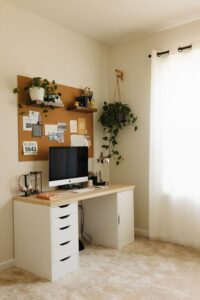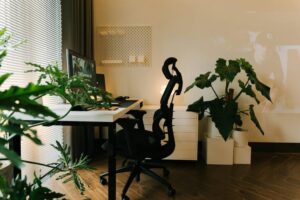

Creating a home office that is both cozy and productive can significantly improve your work-from-home experience. A well-designed workspace fosters focus, comfort, and motivation, helping you maintain a healthy work-life balance. If you’re setting up your office or looking to refresh it, here are some practical tips to help you build the perfect environment.
Choose the Right Location
Where you place your home office sets the foundation for your workday. Ideally, pick a quiet spot with minimal distractions. If possible, opt for a room with a door to separate work from home life. If space is limited, a nook or corner can be adequate when properly organised.
Natural light is a huge plus—it can boost mood and energy levels. Position your desk near a window to take advantage of sunlight. If natural light is limited, consider daylight-mimicking bulbs to brighten your workspace.
Invest in Comfortable and Functional Furniture
Comfort is crucial for spending long hours at your desk. Here are some furniture essentials to keep in mind:
– Ergonomic chair: Choose a chair with adjustable height, lumbar support, and comfortable padding.
– Spacious desk: Select a desk large enough to hold your computer, documents, and other work materials without feeling cluttered.
– Storage solutions: Use shelves, filing cabinets, or desk organizers to keep supplies tidy and within reach.
By investing in ergonomic and practical furniture, you not only prevent discomfort but also promote better posture and reduce fatigue.
Personalise Your Workspace for Comfort and Inspiration
Adding personal touches can make your workspace inviting and inspiring:
– Soft textiles: Add a cozy rug or a cushioned seat pad.
– Plants: Indoor plants improve air quality and add life to your office.
– Artwork or photos: Display art or photos that motivate you or bring you joy.
– Lighting: Use warm desk lamps or fairy lights to create a relaxing atmosphere.
These small adjustments help your workspace feel uniquely yours, making it more pleasant and motivating.
Keep Your Desk Organised and Clutter-Free
A tidy desk can help reduce stress and boost productivity. Here are some organisation tips:
– Use cable management tools to avoid tangled wires.
– Store stationery in holders or drawers.
– Use trays or baskets for paperwork.
– Keep only daily essentials on your desktop.
Regularly declutter your workspace to keep focus on your tasks, not distractions.
Incorporate Technology That Enhances Productivity
Choose tools that support your work style and reduce friction:
– A good quality monitor with adjustable height improves viewing comfort.
– Noise-cancelling headphones help block background noise.
– Wireless chargers or docks reduce clutter.
– Printer and scanner should be accessible but not crowd your desk.
Make sure your internet connection is stable and fast enough to avoid interruptions during video calls or large uploads.
Create a Routine to Maximise Efficiency
Even the best physical environment needs a well-planned routine:
– Set regular working hours and stick to them.
– Take breaks every hour to stretch and rest your eyes.
– Use time management techniques like Pomodoro to maintain focus.
– Designate specific times for checking emails and messages.
A consistent schedule helps separate work time from personal time, reducing burnout.
Pay Attention to Ambient Elements
Background elements can subtly impact your productivity:
– Sound: Play instrumental music or white noise if it helps concentration.
– Temperature: Keep the room at a comfortable temperature, neither too warm nor too cold.
– Air quality: Ventilate regularly or use air purifiers for fresh air.
Optimising these details improves your overall comfort and work efficiency.
Final Thoughts
Creating a cozy yet productive home office takes some effort, but it’s well worth it. Choosing the right location, investing in ergonomic furniture, personalising your space, keeping it organised, and maintaining a good routine will make your home office a place where you enjoy spending time and get your work done efficiently. Start today by implementing one or two of these tips—it’s the first step toward a better work-from-home experience.